How to deploy React Js project to GITHUB pages?

Introduction
In this article, we will understand and know how to deploy or publish a React application on GitHub pages.
What are GitHub pages?
- GitHub Pages is a static website hosting service and it is free of charge.
- It takes resources like HTML, CSS, and JavaScript files directly from the GitHub repository.
- We can host our website on GitHub’s with github.io domain or our own custom domain name.
Prerequisite:
- Create an Account in GitHub
- Create Repo in GitHub
- Keep your USERNAME, Repo Name and Repo URL ready
Note: this feature is available with react-scripts@0.2.0 and higher.
Step 1: Add homepage to package.json
The step below is important! If you skip it, your app will not deploy correctly.
Open your package.json and add a homepage field for your project:
"homepage": "https://myusername.github.io/my-app", or for a GitHub user page:
"homepage": "https://myusername.github.io",or for a custom domain page:
"homepage": "https://mywebsite.com",In my case myusername(Github Username) is ravee-in and my-app(Repository name) is ToDoList
"homepage": "https://ravee-in.github.io/ToDoList",Create React App uses the homepage field to determine the root URL in the built HTML file.

Step 2: Install gh-pages and add deploy to scripts in package.json
Now, whenever you run npm run build, you will see a cheat sheet with instructions on how to deploy to GitHub Pages.
To publish my ToDoList App at https://ravee-in.github.io/ToDoList, run:
npm install --save gh-pagesAdd the following scripts in your package.json:
"predeploy": "npm run build",
"deploy": "gh-pages -d build",
The predeploy script will run automatically before deploy is run.

Step 3: Deploy the site by running npm run deploy
Then run:
npm run deployStep 4: For a project page, ensure your project’s settings use gh-pages
Now go to your Github and update the
Settings–>Github Pages–>source (change to gh-pages branch)–>root–>Save
Finally, make sure GitHub Pages option in your GitHub project settings is set to use the gh-pages branch:

*Your React Application is Published*
In some cases you can see the following error.
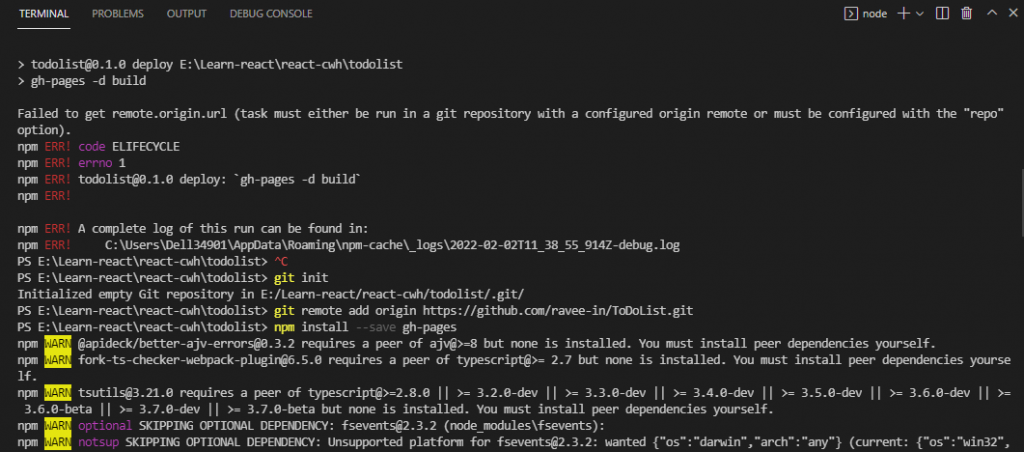
If it’s your case then follow the below mentioned approach:
Step 1: Add homepage to package.json
The step below is important! If you skip it, your app will not deploy correctly.
Open your package.json and add a homepage field for your project:
"homepage": "https://myusername.github.io/my-app", or for a GitHub user page:
"homepage": "https://myusername.github.io",or for a custom domain page:
"homepage": "https://mywebsite.com",In my case myusername(Github Username) is ravee-in and my-app(Repository name) is ToDoList
"homepage": "https://ravee-in.github.io/ToDoList",Create React App uses the homepage field to determine the root URL in the built HTML file.
Step 2: Start a new project with Git
git initStep 3: Create a remote connection called origin
git remote add origin <repo_link>Refer the below image for repo link. (In my case repo link is https://github.com/ravee-in/ToDoList.git)
git remote add origin https://github.com/ravee-in/ToDoList.git
Step 4: Install gh-pages and add deploy to scripts in package.json
Now, whenever you run npm run build, you will see a cheat sheet with instructions on how to deploy to GitHub Pages.
To publish my ToDoList App at https://ravee-in.github.io/ToDoList, run:
npm install --save gh-pagesAdd the following scripts in your package.json:
"predeploy": "npm run build",
"deploy": "gh-pages -d build",
The predeploy script will run automatically before deploy is run.
Step 5:Create Build and Deploy the site by running the below commands
npm run build
npm run deploy
Congratulations! Your project is published.
Step 6: For a project page, ensure your project’s settings use gh-pages
Now go to your Github and update the
Settings–>Github Pages–>source (change to gh-pages branch)–>root–>Save